Technology
How to Find Businesses With Multiple Google Maps Locations
Learn how to find and verify multi-location businesses in Google Maps, then group branches under parent accounts for better prospecting. This guide shows how to turn raw listings into prioritized, account-based leads.
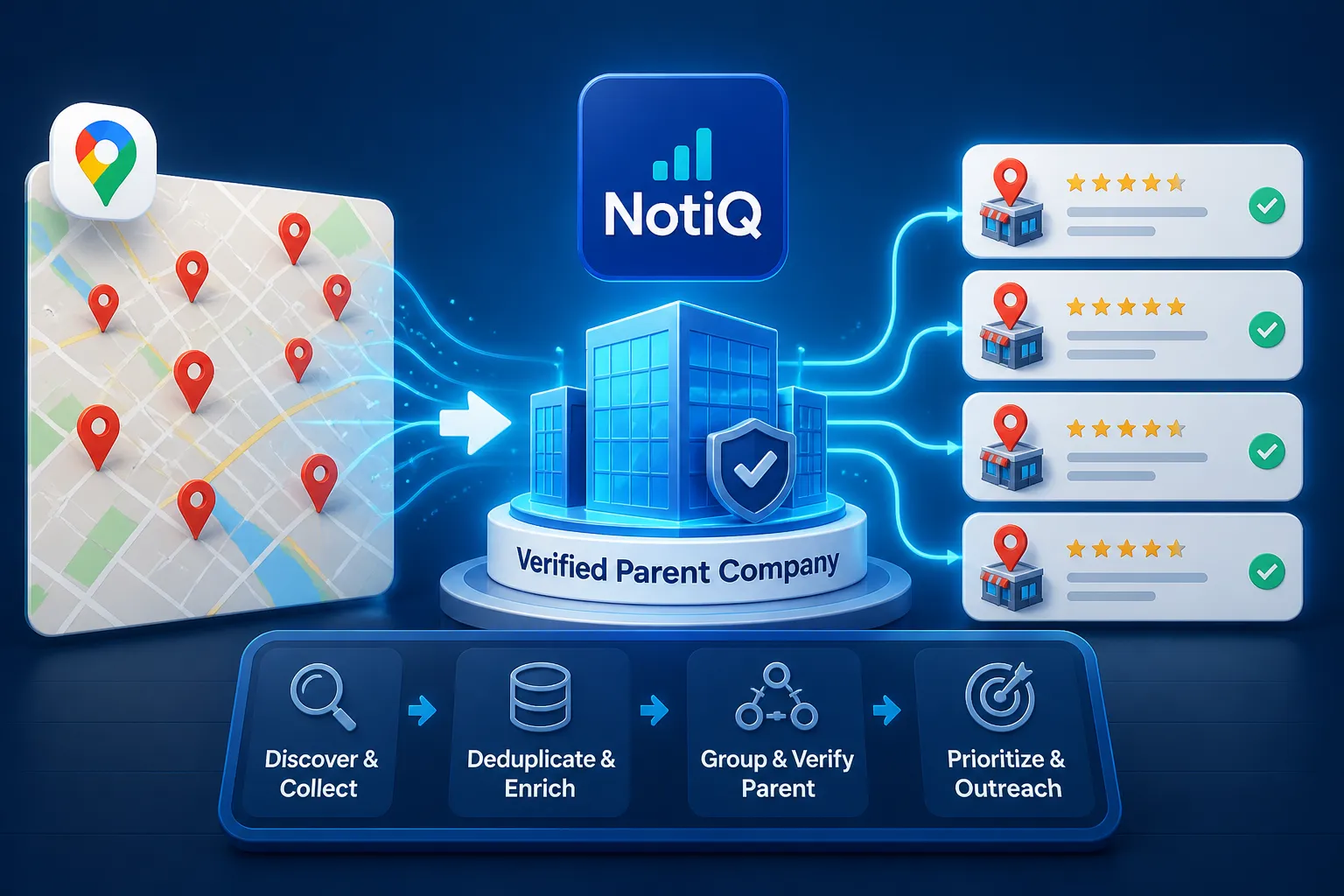
1. Introduction: Why Google Maps Listings Must Become Account Intelligence
Finding a single business listing online is easy. The real prospecting challenge lies in determining which of those scattered listings actually belong to the same operating company. For sales, marketing, and revenue operations professionals, mapping individual branches to a centralized corporate entity is the foundation of effective account-based lead generation.
When you learn how to find businesses with multiple Google Maps locations, you unlock highly qualified leads for account-based marketing (ABM), territory planning, local services, and operational outreach. However, to do this effectively, you must distinguish between a location-level record(a single physical branch) and a parent-level account(the corporate entity driving the buying decisions). Exporting a raw list of places is insufficient; those places must be organized into actionable intelligence.
Multi-location prospecting is the process of finding multiple branches, verifying their shared business identity, and organizing them under one parent account.
This comprehensive guide delivers a complete workflow covering discovery, verification, entity resolution, prioritization, dataset enrichment, CRM activation, and ongoing data maintenance. By transforming branch-level discovery into structured account intelligence, platforms like[NotiQ](/)offer an account-focused workflow for identifying, grouping, and prioritizing multi-location businesses. This approach ensures your multi-location lead generation efforts target verified parent companies rather than disconnected dots on a map, elevating your overall Google Maps prospecting strategy.
2. Define and Discover Multi-Location Businesses
Before collecting data, you must establish a strict research scope. Defining your targets prevents the confusion that often arises when mixing corporate branches, franchises, subsidiaries, and independent businesses that merely share similar names.
What Counts as a Multi-Location Business?
Understanding what constitutes a true multi-location entity is critical. A location count alone does not prove common ownership or a shared buying process. You must distinguish between:
• A single business with several branches: A localized company operating a few distinct storefronts or offices under one central management structure.
• A corporate-owned chain: A large enterprise where all locations are owned and operated by a single corporate parent.
• A franchise network: A brand with independently owned and operated locations that share marketing but have distinct local decision-makers.
• Distributed networks: Healthcare networks, dealership groups, retail chains, or distributed service providers that may have complex subsidiary structures.
• Independent businesses: Separate, unaffiliated businesses that happen to share a similar name (e.g., "Main Street Cafe").
Because a physical establishment is not always synonymous with the broader enterprise, your dataset must utilize both parent-account records and child-location records. Official Census definitions for establishments and multi-unit enterprises emphasize why individual locations should not automatically be treated as separate companies. Proper classification ensures that when you target multiple location businesses, multi-location businesses, or businesses with multiple locations, you are engaging the correct decision-making tier.
Build a Systematic Google Maps Discovery Plan
A single, broad search query will inevitably produce incomplete coverage and uneven results. To execute effective Google Maps prospecting and find businesses with multiple locations, you must build a repeatable, systematic discovery plan.
First, define your target parameters:
• Business categories: Specific industry classifications.
• Geographic territories: Defined cities, regions, or zip code radii.
• Minimum number of locations: The threshold that qualifies a business for your specific ABM campaign.
• Relevant brand or service characteristics: Specific keywords indicating the services provided.
Next, deploy repeatable searches across multiple dimensions:
• Category plus city (e.g., "HVAC repair in Austin").
• Category plus region (e.g., "Logistics companies in the Midwest").
• Brand variants and industry-specific terminology.
• Territory-based variations where appropriate.
Unlike raw data extraction workflows that focus primarily on exporting individual place records, a structured discovery plan documents the process. Always record the search query, territory, date checked, and source URL for full auditability. Remember that discovery is not verification. Refer to Google’s multi-location management guidance to understand official concepts regarding locations, location groups, access, and verification. All location-based prospecting must align with platform terms, ensuring responsible, compliant data use.
3. Verify Listings and Resolve Parent Accounts
Once you have a list of candidates, you must determine whether several listings truly belong to one parent company. This stage is vital for reducing false matches, eliminating duplicates, and filtering out stale records.
Normalize Location Records Before Matching
Before matching records, you must standardize the data. Normalizing business location data ensures that slight variations do not prevent accurate grouping. Standardize the following fields:
• Business and brand names.
• Website domains (stripping "www" and standardizing subdirectories).
• Phone numbers (formatting to a standard international or national layout).
• Street addresses (standardizing abbreviations like "St." vs. "Street").
• Categories and listing status.
Always preserve the original listing values alongside the normalized values for auditability. Flag common inconsistencies that complicate the grouping of businesses with multiple locations, such as abbreviated branch names, different local phone numbers, rebranded locations, relocated businesses, and shared domains that point to different branch pages. Assign a last-checked date and source URL to every Google Business Profile location. As detailed in this academic overview of entity resolution, record linkage, deduplication, schema matching, and the use of names, addresses, and phone numbers as quasi-identifiers are critical for accurate data normalization.
Match Branches to the Same Parent Company
Matching branches to a parent company requires a strict hierarchy of evidence. Use the following matching hierarchy for multi-location prospecting:
1. Shared official domain: Multiple listings linking to the exact same parent-company website.
2. Consistent brand name and pattern: Uniform naming conventions across regions.
3. Shared centralized contact: A single toll-free number or centralized contact email.
4. Official location finder: A corporate website directory explicitly listing the branches.
5. Matching address patterns: Regional operating patterns that align with known corporate footprints.
6. Ownership evidence: Publicly verifiable franchise or ownership documentation.
Separate strong evidence (shared domains) from supporting evidence (similar names). Introduce confidence levels:
• High confidence: Several independent identifiers agree entirely.
• Medium confidence: Brand and domain align, but exact legal ownership is unclear.
• Low confidence: Name similarity exists without definitive supporting evidence.
Automated entity resolution should flag uncertain records for human review rather than forcing every listing into a parent account grouping. Distinguish between a brand relationship (a public-facing banner) and a legal parent-company relationship.Census methods for linking establishments to firms support the use of identifiers and probabilistic name-and-address matching for this purpose. Furthermore,SBA guidance on business registration and legal identity clarifies the difference between DBAs, legal entities, and public brands. For adjacent resources on AI-assisted account research, data organization, and prioritization, consider integrating tools like Scaliq AI.
Handle Franchises, Duplicates, and Closed Locations
Franchise lead generation requires treating franchise locations with a separate ownership and buying-process classification. A franchise may share a brand, but the buying power rests with the local operator, not corporate headquarters.
Store specific fields to manage this:
• Corporate-owned, franchise-owned, or unknown.
• Brand affiliation.
• Suspected parent company.
• Local operator or franchisee name.
Create strict decision rules to verify multiple locations and handle anomalies. Duplicate Google Maps listings, permanently closed locations, relocated branches, rebranded locations, and similar names with no verified relationship must be managed carefully. Closed or duplicate records should be retained with a specific status label rather than silently deleted; this keeps the dataset auditable and prevents re-adding bad data during future scrapes. Rely on Google’s multi-location management guidance and Google Business Profile guidelines for official representation and eligibility criteria. Always clearly distinguish verified public business information from assumptions about legal structure.
4. Build a Location-to-Account Prospecting Dataset
To move beyond a flat CSV of place listings, you must build a practical data model that preserves branch-level detail while enabling parent-account prioritization and CRM activation.
Store Parent-Account Fields Separately From Location Fields
A proper location-to-account data model separates the enterprise from its branches. One account can contain many locations, while each location maintains its own evidence and operational status.
Recommend Account-Level Record:
• Parent company or account name.
• Brand name.
• Website domain.
• Number of verified locations.
• Geographic footprint (e.g., "Southeast US").
• Business category.
• Ownership or franchise classification.
• Account fit and priority.
• Parent-account confidence.
Recommend Location-Level Record:
• Branch name.
• Full address.
• City, region, and territory.
• Phone number.
• Google Maps or listing URL.
• Website or location-page URL.
• Category.
• Operating status (Open, Closed, Relocated).
• Last-checked date.
• Location-level confidence.
This relational structure is what turns a generic multi-location business list into a powerful engine for account-based marketing local businesses. For more insights on structured account research, grouping, and prioritization workflows, explore the NotiQ blog.
Add Evidence, Confidence, and Data Freshness Fields
Every account-location relationship in your Google Maps business directory must be traceable to supporting evidence. When automated workflows group inconsistent records, transparent evidence is essential.
Add the following fields to your dataset:
• Evidence URL (e.g., the corporate "Find a Location" page).
• Discovery query used to find the listing.
• Source type.
• Match rationale (e.g., "Domain and phone match").
• Business listing verification status.
• Confidence score (High, Medium, Low).
• Last-checked date.
• Review owner (the team member who verified the link).
Keeping original and normalized values together ensures location intelligence for sales teams is accurate and trustworthy. These fields support routine audits, seamless team handoffs, data refreshes, and corrections. Confidence scoring allows your revenue operations team to focus manual review exclusively on the most uncertain records. Never imply that a listing is active, owned by a particular entity, or suitable for outreach unless the available evidence explicitly supports that conclusion.
5. Score and Prioritize High-Value Accounts
Transitioning from asking, “Which companies have multiple locations?” to “Which verified accounts deserve our attention first?” requires a robust scoring framework.
Create a Multi-Location Prospect Score
To prioritize business leads effectively, introduce a transparent scoring framework based on multiple dimensions:
• Verified location count: The total number of active, confirmed branches.
• Geographic density: Territory coverage aligned with your sales regions.
• Category fit: How closely the business aligns with your ideal customer profile.
• Website and location-page quality: Indicators of digital maturity.
• Expansion signals: Evidence of new locations opening.
• Contactability: The availability of reachable decision-makers.
• Estimated account value: Strategic relevance to your revenue goals.
• Data confidence and freshness: How reliable and recent the data is.
In location-based prospecting, location count should be a prioritization input, not the sole qualification criterion. Document the specific reason an account receives a high, medium, or low priority. It is highly recommended to maintain separate scores for account fit, expansion potential, data confidence, and outreach readiness. This scoring model is a practical framework for multi-location lead generation, not a universal benchmark; weighting should always reflect your specific sales, marketing, territory, or service objectives.
Identify Expansion, Coverage, and Account-Fit Signals
Observable signals help identify businesses with locations nationwide that are primed for your services. Separate observable facts from assumptions about buyer intent, and always record the evidence behind each classification.
Account scoring supports verticalized strategies across industries. Whether you are selling staffing, logistics, facilities services, payments, local SEO, franchise recruitment, or software, prioritizing multi-location business leads based on these signals ensures high ROI.
Show Why One Account Ranks Above Another
To understand high-value account prioritization, consider two illustrative account records using the dataset fields defined earlier.
Account A: "Apex Regional Logistics"
• Verified Locations: 8
• Territory: Strictly within the target territory (Texas).
• Category Fit: Exact match (B2B Logistics).
• Evidence Quality: High (Shared domain, corporate directory confirms all 8).
• Expansion Indicators: 2 new locations added in the last 6 months.
Account B: "National Freight Co."
• Verified Locations: 45
• Territory: Scattered nationally; only 3 in the target territory.
• Category Fit: Broad match (General Transport).
• Evidence Quality: Medium (Franchise model, unclear local ownership).
• Expansion Indicators: None observed recently.
In multi-location prospect scoring, Account A easily outranks Account B. Account A is smaller but highly relevant, perfectly verified, expanding, and geographically aligned. Account B is larger but uncertain in its ownership structure and less relevant to the regional territory. This framework demonstrates how rigorous lead qualification prevents sales teams from wasting time on massive but disjointed accounts.
6. Activate Research for Outreach and CRM Workflows
The ultimate goal is to turn verified location-to-account data into usable workflows for sales, marketing, and revenue operations.
Connect Parent Accounts to CRM and Territory Planning
Importing this data into your CRM requires maintaining the parent-child architecture. You should import:
• One parent account record.
• Multiple associated branch or location records linked to the parent.
• Account owner and territory fields.
• Verification status and confidence scores.
• Source URLs and last-checked dates.
Use deduplication keys based on combinations of normalized domains, phone numbers, addresses, and account identifiers to prevent CRM bloat. Sales teams can use this structure for accurate sales territory planning, assigning account ownership, running regional campaigns, and executing local service expansion. It allows for parent-level reporting with vital branch-level context.
Crucially, warn your RevOps team against creating a separate, unrelated sales opportunity for every branch when the buying process is centralized. CRM account enrichment should reflect the evidence available; uncertain parent-child relationships must remain flagged for review. To streamline this transition from location discovery to grouped, prioritized account research, utilize the workflow layer provided by[NotiQ](/).
Personalize Outreach Using Branch-Level Context
Effective multi-location outreach maintains a single, unified account strategy while using branch details to personalize messaging. Use location-level context—such as the relevant territory, the number and distribution of branches, the local operating footprint, and specific service models—to craft compelling emails and calls.
Do not treat every branch as a separate decision-maker or assume centralized ownership without proof. Recommend different outreach paths based on the entity type:
• Corporate or centralized accounts: Pitch the VP of Operations or Procurement at headquarters, referencing their specific regional footprint.
• Franchise systems: Pitch the local franchisee or operating group, acknowledging their specific local branches.
• Independent local operators: Treat as a standard local business lead generation effort.
• Unknown ownership structures: Use exploratory messaging to map the buying committee.
Connecting outreach personalization to your actual service or territory objective is what separates highly effective parent account prospecting from spam. For adjacent guidance on AI-assisted research organization and outreach prioritization, refer to Scaliq AI.
Refresh and Maintain the Dataset
Business listing data quality degrades rapidly. Establish a strict refresh process to check for new locations, closed or relocated branches, corporate rebrands, changed domains or phone numbers, updated ownership classifications, and stale evidence.
The refresh cadence for your Google Maps prospecting workflow should depend on the business category, geography, and dataset purpose (e.g., retail changes faster than industrial manufacturing). Preserve change history rather than overwriting prior research, allowing you to track multi-location account research trends over time.
Final Quality-Control Checklist:
• Are duplicate locations removed or explicitly flagged?
• Are permanently closed listings labeled as such?
• Are parent accounts supported by verifiable evidence?
• Are franchise relationships separated from corporate ownership?
• Are source URLs and review dates present for every record?
• Are account scores explainable and documented?
Always adhere to responsible-use guardrails regarding platform terms, privacy, consent, and data accuracy, recognizing the difference between publicly visible business information and personal contact data.
7. Conclusion: Turn Google Maps Discovery Into Account-Level Intelligence
Mastering how to find businesses with multiple Google Maps locations requires moving beyond basic data scraping. The complete workflow involves seven distinct steps:
1. Define industries, territories, and location thresholds.
2. Discover listings systematically across targeted geographies.
3. Normalize and verify records to ensure data integrity.
4. Resolve branches into verified parent accounts.
5. Store account and location data separately in a relational model.
6. Score accounts using fit, footprint, evidence, and priority signals.
7. Activate the results in CRM, territory planning, and outreach workflows.
The true value of Google Maps lead generation is not the raw number of map listings you can export, but the quality of the verified relationships between those locations and their parent accounts. By adopting an account-focused workflow, you stop treating every branch as an independent lead and start selling to the enterprise. To identify, group, and prioritize multi-location businesses with precision, explore[NotiQ](/)and transform your multi-location lead generation strategy today.
Frequently Asked Questions
- How can you identify businesses with multiple Google Maps locations?
- To identify businesses with multiple locations, execute a concise sequence: search systematically by category and geography, collect listing evidence, normalize identifiers (like phone numbers and addresses), verify official website relationships, and group locations under parent accounts. A single Google Maps prospecting search is unlikely to provide complete account-level coverage; it requires systematic, repeatable queries.
- How do you tell whether two Google Maps listings belong to the same company?
- To verify multiple Google Maps locations and ensure accurate parent company matching, look for shared official domains, official location finders on corporate websites, consistent brand patterns, centralized phone numbers, matching address footprints, and public ownership evidence. As noted in entity-resolution methodologies, always use confidence scoring and require manual review for ambiguous matches.
- How many locations should a business have before it is considered multi-location?
- The threshold for how many locations is a multi-location business depends entirely on your specific research objective and should be defined before discovery. A practical prospecting threshold for multi-location businesses (e.g., 3+ locations for regional SaaS sales) differs from a legal or statistical enterprise definition. There is no unsupported universal number.
- How should franchise locations be handled?
- In franchise lead generation, the brand, the local operator, and the corporate entity usually require separate records because the buying power is decentralized. Record ownership as corporate-owned, franchise-owned, or unknown when evidence is incomplete. This classification directly informs your outreach strategy and buying-process assumptions for franchise business locations.
- How can you avoid duplicate or permanently closed Google Maps listings?
- To manage duplicate Google Maps listings and closed business listings, utilize status fields, last-checked dates, duplicate deduplication keys, source URLs, and explicit closure or relocation labels. Removing records entirely without preserving their status reduces auditability and increases the risk of re-importing bad data during future discovery cycles.
- What fields should a multi-location prospecting dataset contain?
- A robust multi-location business list must replace a flat spreadsheet with a parent-child location-to-account dataset. It should contain parent-account fields (brand, total locations, category), child-location fields (branch address, local phone, operating status), evidence fields (source URLs, match rationale), confidence fields, and data freshness fields (last-checked dates).
- How can multi-location research support account-based lead generation?
- Verified branch relationships enable accurate account scoring, efficient sales territory planning, clear account ownership, highly personalized outreach, and seamless CRM activation. Multi location lead generation ensures that your account-based lead generation workflow supports both the high-level parent strategy and the localized branch-level context necessary to close deals.
Continue Reading
More articles you might find useful
Google Maps Lead Generation for Pool Maintenance Companies
Learn how pool maintenance companies can use Google Maps to find qualified commercial prospects, organize outreach, and grow recurring service contracts. This guide breaks down a practical workflow for targeting hotels, apartments, HOAs, and more.
Read the article →
Google Maps Prospecting for Commercial Locksmith Companies
Learn how commercial locksmith companies can use Google Maps to find, verify, and prioritize high-value local B2B prospects. This guide outlines a practical workflow for turning map research into recurring commercial service opportunities.
Read the article →
How to Find Local Businesses With Poor Mobile Websites
Learn how to find local businesses with poor mobile websites using a repeatable audit workflow. This guide shows how to validate issues, score prospects, and turn findings into stronger web design leads.
Read the article →Popular industry lead playbooks
Maps search examples and niche outreach for the verticals teams prospect most.